

Appearance
Tutorial
Step-by-step walkthrough applying ISVF to a fictional water booster pumping station, with worked calculations.
Fictional example
The utility, the station, the devices, the checklist items, the weights and the answers are all invented for illustration. The items and weights are not the reference questionnaire.
Terms and formulas are defined on the Definitions page.
The scenario
Northvale Water, a small municipal utility, runs the Hillcrest booster station, which keeps water pressure up for a hillside district. The station is unmanned. Its control system was installed by an integrator ten years ago and has been extended piece by piece since. The utility has budget for one penetration test next year and wants to know where it should focus.
The station consists of three variable-speed pump drives and a chlorine analyzer in the pump hall, a PLC in a locked control cabinet, an operator panel mounted on the cabinet door, and a cellular telemetry gateway that connects the station to the utility's central SCADA system. The integrator connects a maintenance laptop on site when changes are needed.
Phase 1: Deployment
Step 1: Inventory the devices
List every device that implements a function of the system, with type and version, and note which function it implements.
| Device | Type / version | Function |
|---|---|---|
| 3 pump drives | Vendor A VFD, FW 3.1 | Pump speed control |
| Chlorine analyzer | Vendor B, analog 4-20 mA output | Water quality measurement |
| Station PLC | Vendor C, FW 2.4 | Station control logic |
| Operator panel | Vendor C panel PC, Windows IoT | Local operation and local trend storage |
| Telemetry gateway | Vendor D cellular router, OS 5.2 | Connection to central SCADA |
Step 2: Define the components
ISVF does not prescribe a decomposition method, but the decomposition determines which items are relevant and how many values enter the aggregated scores. The reasoning behind it is part of the result. The procedure below is iterative: start coarse, split only where there is a reason, and write the reason down.
2a. Draw the assessment boundary
First decide what belongs to the system at all, by asking what the utility can verify and change at this site.
| Inside | Outside | Why |
|---|---|---|
| Everything in the station building and on its walls | The central SCADA system at the utility's control centre | It serves all stations and deserves its own assessment. |
| The telemetry gateway | The mobile operator's network | The utility neither controls nor can inspect it. |
| The station's maintenance port and switch | The integrator's maintenance laptop | The utility does not manage the laptop. |
TIP
Excluded parts do not vanish from the assessment. They are where attacks come from, and the items facing them stay relevant: the integrator's laptop is assessed through the items on documented connections and remote access (NET-2, REM-1 to REM-3), and the SCADA link through the telemetry gateway's items.
2b. Start with one component
Treat the whole station as a single component. This is a valid starting point: a one-component assessment shows what is weak on average, but not where. Every split that follows should make a weakness easier to locate.
2c. Split along physical barriers
Walk the site and note every barrier an attacker would have to pass physically.
| Barrier | Behind it | Who can pass |
|---|---|---|
| Station fence and building door | Pump hall, cabinet front with the operator panel | Utility staff, integrator, cleaning contractor |
| Locked control cabinet | PLC, switch, maintenance port | Instrumentation technician only |
| Locked enclosure on the outside wall | Telemetry gateway | Mobile network contractor only |
This gives three areas: the building interior, the inside of the cabinet, and the gateway enclosure.
2d. Split along logical access
Within each area, check how the devices are reached digitally and who manages them.
- Operator panel and PLC. The panel sits on the cabinet door, so anyone inside the building can touch it, and it has its own Windows login. The PLC is behind the lock and can be programmed only through the maintenance port inside the cabinet or from central SCADA. Physical and digital access differ, so they become two components.
- Pump drives and analyzer. All are in the open pump hall. The drives talk to the PLC over a serial fieldbus; the analyzer has no digital interface at all, only an analog signal to the PLC. Splitting them would create a component with almost every item not relevant. They are kept together as the field devices of the hall. Because one component gets one answer per item, an item counts as satisfied only if it holds for every device in the component.
- Telemetry gateway. It is behind its own lock and managed remotely by the mobile network contractor. Separate component.
2e. Check functions against devices
Compare the function list with the device list:
- One device, two functions. The operator panel also stores local trend data. Both functions share the same hardware, operating system and login, so they are assessed once.
- One function, several devices. Pump speed control runs on three identical drives with the same firmware and configuration, so they are treated as one.
- A function with no device. The station has no central log server. Its absence does not make the logging items irrelevant; it makes them a "no".
2f. Test each boundary
For every boundary, ask: do the physical or digital access controls differ on the two sides? If not, merge. Two practical checks help:
- Same answers? If two candidate components would get identical answers to nearly every item, the boundary adds nothing.
- Actionable? Would a low value on this component point the engineers to something specific?
Splitting has a cost: more checklists to fill in, and more values in the system score.
The result
| ID | Component | Devices | Boundary rationale |
|---|---|---|---|
| C1 | Pump hall field devices | 3 drives, chlorine analyzer | Open hall inside the building; no device reachable except through the PLC; one answer per item, satisfied only if true for all devices. |
| C2 | Station PLC | PLC | Inside the locked cabinet; programmable via the maintenance port or central SCADA. |
| C3 | Operator panel | Panel PC | On the cabinet door, reachable by anyone in the building; own Windows login; two functions, assessed once. |
| C4 | Telemetry gateway | Cellular router | Own locked enclosure; managed remotely by the mobile network contractor. |
Record this table and the boundary decisions of 2a with the results. A later assessment compares only components whose boundaries are unchanged.
Step 3: Define the profile
The assessors, not the station staff or the integrator, set relevance before any answers are collected, and note a reason for each decision. The checklist used in this tutorial has eight invented item groups. Start with whole groups:
| Group | C1 | C2 | C3 | C4 |
|---|---|---|---|---|
| PHY Physical protection | ✓ | ✓ | ✓ | ✓ |
| SIG Signal and field wiring | ✓ | ✓ | - | - |
| COM Communication security | ✓ | ✓ | ✓ | ✓ |
| NET Network and segmentation | ✓ | ✓ | ✓ | ✓ |
| REM Remote access | - | ✓ | ✓ | ✓ |
| LOG Logging and detection | ✓ | ✓ | ✓ | ✓ |
| CFG Configuration, firmware and backup | ✓ | ✓ | ✓ | ✓ |
| OS Operating system | - | - | ✓ | - |
Three decisions deserve a note:
- REM is not relevant for C1. The drives and the analyzer have no remote access function at all. This is different from a function that exists but is badly protected.
- OS is relevant only for C3. The panel runs Windows with local accounts that the utility administers. The gateway also runs an operating system, but only as the appliance's runtime; nobody logs in to it, so it is covered by CFG.
- LOG stays relevant for every component, although the station has no central log server. A missing control is a "no", not a reason to exclude the items.
Then decide individual items inside relevant groups, with a justification each. One example that matters for the calculation below:
| Component | Item | Relevance | Justification |
|---|---|---|---|
| C2 | NET-4 Wireless links end in a separate zone | Not relevant | The PLC has no radio interface (datasheet). |
The profile also fixes the parameters items refer to, for example the log retention period (90 days) and the maximum duration of an approved remote session (4 hours).
Step 4: Set the weights
For each item, the assessors assume the component does not satisfy it and estimate how much that helps an attacker with respect to each indicator. In this tutorial, a weight of 1 means "helps directly" and 0.5 means "helps partly". The ten items used in the worked example:
| Item | Statement | CR | II | NN | ACC | BR |
|---|---|---|---|---|---|---|
| NET-1 | The component sits in a network zone separated from office IT. | 0.5 | 1 | 1 | ||
| NET-2 | Only documented, required connections can reach the component. | 0.5 | 1 | 1 | ||
| NET-3 | The component cannot reach the internet directly. | 0.5 | 0.5 | 1 | ||
| NET-4 | Wireless links of the component end in a separate zone. | 0.5 | 1 | 0.5 | ||
| NET-5 | New or unknown devices on the component's segment are detected. | 1 | 0.5 | |||
| REM-1 | Remote access requires an individual account and a second factor. | 1 | 0.5 | |||
| REM-2 | Remote sessions are approved per session and time-limited. | 0.5 | 1 | 0.5 | ||
| REM-3 | Remote sessions are recorded, and the records are kept outside the component. | 1 | ||||
| COM-1 | The component accepts control commands only from authenticated senders. | 1 | 0.5 | |||
| COM-2 | A passive observer on the segment cannot read the communication content. | 1 |
How to read a row
If NET-2 is not satisfied, an undocumented connection makes the component easier to reach (ACC), easier to move on from (BR), and partly easier to impersonate others towards (NN).
Freeze the configuration and give it an identifier, for example northvale-hillcrest-1.0.0.
Phase 2: Execution
Step 5: Collect the answers
Answer every relevant item for every component. A "yes" needs something checkable: a configuration, a log, a test, a document, or, where nothing else is possible, an interview. Answers for C2, the station PLC:
| Item | Relevant | Answer | Basis |
|---|---|---|---|
| NET-1 | Yes | Yes | The PLC is in the station control VLAN; office IT is not routed to the station (switch configuration). |
| NET-2 | Yes | No | The maintenance port on the switch accepts any device; it is not in the network documentation (site walk). |
| NET-3 | Yes | Yes | The gateway blocks all internet traffic from the station VLAN (gateway rules). |
| NET-4 | No | - | Fixed as not relevant in the profile. |
| NET-5 | Yes | No | Nothing watches the segment for new devices. |
| REM-1 | Yes | No | The integrator uses one shared account with a password only. |
| REM-2 | Yes | No | The SCADA-side remote connection to the PLC is always open. |
| REM-3 | Yes | No | Remote sessions are not recorded. |
| COM-1 | Yes | No | The PLC accepts unauthenticated commands over its industrial protocol (test with a protocol client). |
| COM-2 | Yes | No | Traffic between PLC, panel and gateway is plaintext (packet capture). |
Step 6: Close the component
C2 is complete when every item of the checklist has a relevance value and every relevant item has an answer. Repeat for C1, C3 and C4.
Step 7: Calculate
To keep the arithmetic readable, this step uses only the ten items above. In the real evaluation, all relevant items enter the same formulas.
Access Control Complexity (ACC) for C2. Seven items carry an ACC weight. NET-4 is not relevant, so compensation removes it. The relevant weights sum to
(NET-1, NET-2, NET-3, REM-1, REM-2, COM-1). Dividing each by 5.0 gives the compensated weights:
| Item | Weight | Compensated weight | Answer | Contributes to the indicator | Contributes to exposure |
|---|---|---|---|---|---|
| NET-1 | 1 | 0.20 | 1 | 0.20 | 0 |
| NET-2 | 1 | 0.20 | 0 | 0 | 0.20 |
| NET-3 | 0.5 | 0.10 | 1 | 0.10 | 0 |
| REM-1 | 1 | 0.20 | 0 | 0 | 0.20 |
| REM-2 | 1 | 0.20 | 0 | 0 | 0.20 |
| COM-1 | 0.5 | 0.10 | 0 | 0 | 0.10 |
and the exposure contributions sum to .
Why compensation matters
Without compensation, the weight of NET-4 would stay in the denominator: . The PLC would be penalized for not having a radio.
The same calculation for all five indicators these items touch:
| Indicator | Relevant weighted items (sum of weights) | Satisfied (sum) | Value | Without compensation |
|---|---|---|---|---|
| CR | NET-3, COM-2 (1.5) | NET-3 (0.5) | 0.33 | 0.33 |
| II | NET-5, REM-2, REM-3 (2.5) | none (0) | 0.00 | 0.00 |
| NN | NET-1, NET-2, NET-5, COM-1 (2.5; NET-4 not relevant) | NET-1 (0.5) | 0.20 | 0.5 / 3.0 = 0.17 |
| ACC | 6 items (5.0; NET-4 not relevant) | NET-1, NET-3 (1.5) | 0.30 | 1.5 / 6.0 = 0.25 |
| BR | NET-1, NET-2, NET-3, REM-1, REM-2 (4.0; NET-4 not relevant) | NET-1, NET-3 (2.0) | 0.50 | 2.0 / 4.5 = 0.44 |
| REC, FR, PBl, PBr, RI, TB | none | - | not applicable | - |
Three things to notice
- Compensation only matters where an irrelevant item carries weight. NET-4 has weight in NN, ACC and BR, so only those change.
- Applicability. None of the ten items counts towards REC, FR, PBl, PBr, RI or TB, so from this subset these indicators are not applicable, not zero. In the full profile, other item groups supply them.
- A zero is a real result. II is 0.00: none of the three detection-related items is satisfied. On the PLC, an intrusion through these paths would go unnoticed.
Only the checklist is used here, so and .
Phase 3: Reporting
Step 8: Rank the unmet items
For C2 and ACC, the unmet items ranked by their contribution, ties broken by item order:
- NET-2 open maintenance port (0.20)
- REM-1 shared, password-only account (0.20)
- REM-2 always-open remote connection (0.20)
- COM-1 unauthenticated commands (0.10)
The weights separate the first three from COM-1, but not from each other. Here engineering judgment adds what the weights cannot: NET-2, REM-1 and REM-2 all concern how outsiders reach the PLC, and one change to the maintenance and remote access arrangement addresses all three. The ranking is a starting point, not a statement about risk reduction.
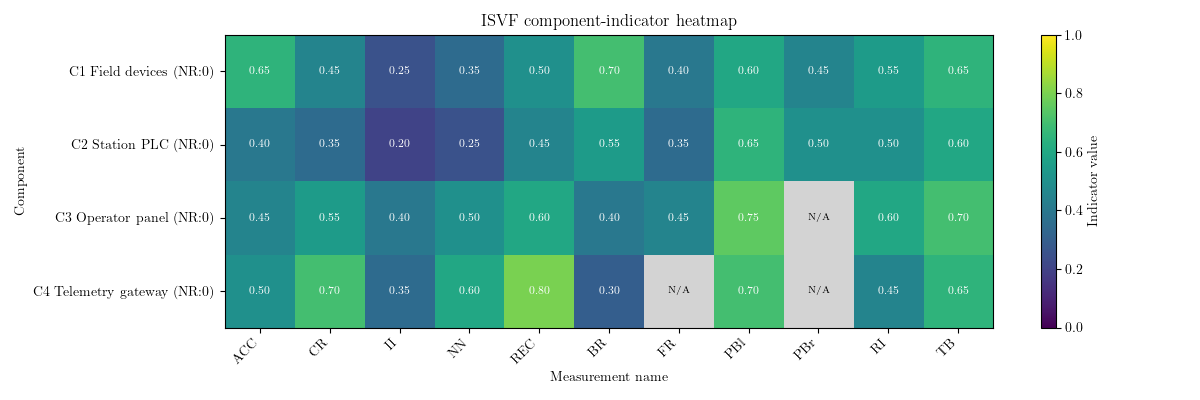
Step 9: Read the heatmap
Repeating the evaluation over the full profile for all components gives the indicator matrix. Low values point to potential weaknesses; "n/a" means not applicable.
| Indicator | C1 Field devices | C2 Station PLC | C3 Operator panel | C4 Telemetry gateway |
|---|---|---|---|---|
| Access Control Complexity | 0.65 | 0.40 | 0.45 | 0.50 |
| Communication Readability | 0.45 | 0.35 | 0.55 | 0.70 |
| Infiltration Inertia | 0.25 | 0.20 | 0.40 | 0.35 |
| Naive Network | 0.35 | 0.25 | 0.50 | 0.60 |
| Reconstructability | 0.50 | 0.45 | 0.60 | 0.80 |
| Backdoor Tunneling | 0.70 | 0.55 | 0.40 | 0.30 |
| False Recipe | 0.40 | 0.35 | 0.45 | n/a |
| Permanent Block | 0.60 | 0.65 | 0.75 | 0.70 |
| Physical Breakdown | 0.45 | 0.50 | n/a | n/a |
| Recovery Inertia | 0.55 | 0.50 | 0.60 | 0.45 |
| Temporary Block | 0.65 | 0.60 | 0.70 | 0.65 |
| Aggregated score | 0.49 | 0.42 | 0.53 | 0.53 |
| Lowest indicator | 0.25 (II) | 0.20 (II) | 0.40 (II, BR) | 0.30 (BR) |
| Items marked not relevant | 54 | 47 | 22 | 39 |
The system score pools the 41 applicable values: . The lowest value in the system is 0.20 (C2, Infiltration Inertia).
As a check on C3, which has ten applicable indicators: the squared exposures sum to 2.25, so
Reproduced run output (CLI)
The tutorial matrix above was executed with the current sigma implementation using a reproducible input bundle at isvf.sztaki.hu/tutorial-run-input:
bash
python3 sigma_operator/main.py \
  -i isvf.sztaki.hu/tutorial-run-input \
  -o isvf.sztaki.hu/assets/tutorial-run-output \
  -f json -l en
Generated heatmap:
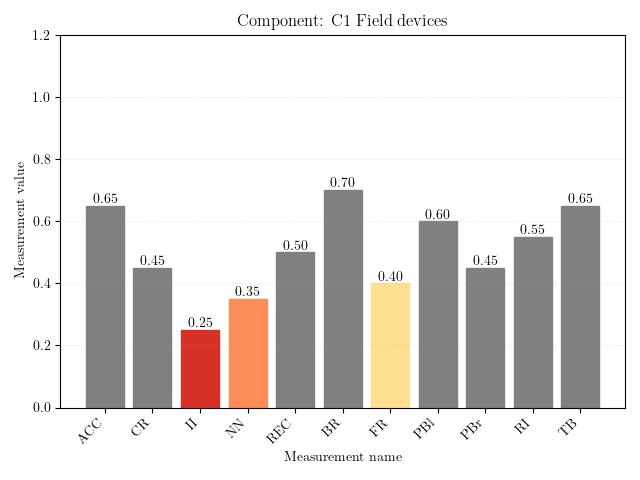
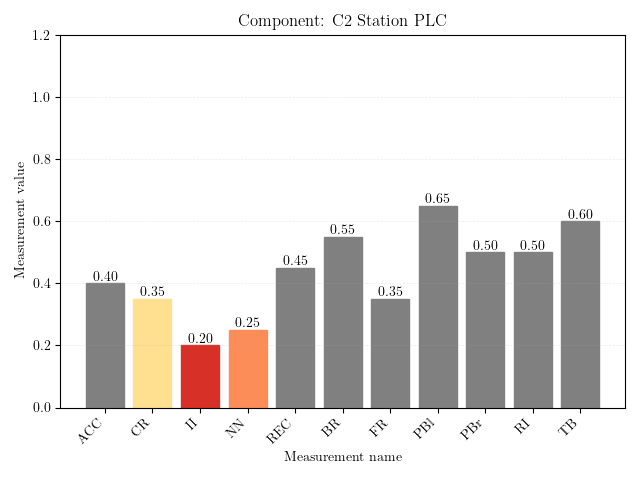
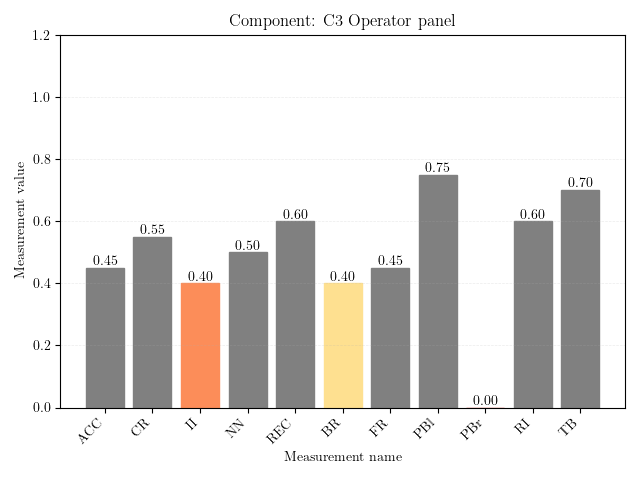
Generated component charts
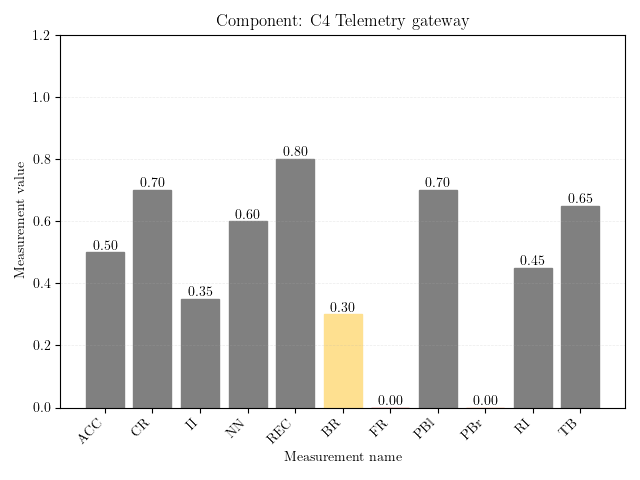
Generated aggregate values from report.json:
| Metric | Value |
|---|---|
| C1 aggregated score | 0.487 |
| C2 aggregated score | 0.420 |
| C3 aggregated score | 0.526 |
| C4 aggregated score | 0.532 |
| System score | 0.487 |
| Global minimum indicator | 0.20 (C2, II) |
What the utility takes from this:
- C2 station PLC: the lowest aggregated score. It accepts commands from anyone who can reach it (NN 0.25), its traffic is readable (CR 0.35), and tampering would go unnoticed (II 0.20). A forged command to the pumps is the first scenario for the penetration test (UKC Delivery, Exploitation, Execution, Impact).
- C4 telemetry gateway: the likeliest stepping stone into the station (BR 0.30), even though its aggregated score is among the best.
- C3 operator panel: reachable by anyone in the building, and a route onward to the PLC (BR 0.40).
- C1 field devices: they trust whatever the PLC sends (NN 0.35), and without central logging nothing about them is recorded (II 0.25).
C3 and C4 have the same aggregated score but different weaknesses, and C4's lowest value is clearly worse. This is why the minimum is always reported next to the score. The not-relevant counts follow the group decisions of Step 3; a count far out of line with similar components would be a reason to recheck the profile.
What-if analysis
Copy the recorded answers, leave the originals untouched, and change the copy as if a measure were already in place. Using the ten items for C2:
| Scenario | ACC | BR | NN |
|---|---|---|---|
| Baseline | 0.30 | 0.50 | 0.20 |
| Maintenance port locked down, personal accounts with second factor (NET-2, REM-1) | 3.5 / 5.0 = 0.70 | 3.5 / 4.0 = 0.88 | 1.0 / 2.5 = 0.40 |
| ... and authenticated commands via a protocol gateway (COM-1) | 4.0 / 5.0 = 0.80 | 0.88 | 2.0 / 2.5 = 0.80 |
WARNING
This simulates the change in the indicators, not the change in actual security.
When someone disagrees
After the report, the integrator argues that REM-2 (per-session approval) and REM-3 (session recording) "do not apply, because remote access is used only a few times a year". Marking them not relevant would raise ACC for C2 from 1.5 / 5.0 = 0.30 to 1.5 / 4.0 = 0.38 and BR from 2.0 / 4.0 = 0.50 to 2.0 / 3.5 = 0.57, without any change at the station. This is the manipulation that compensation makes possible.
The request is rejected:
- Relevance was fixed by the assessors before collection, and both items clearly can apply: remote access exists, however rarely it is used. Rare use is an argument about risk, not about relevance.
- Disagreement with a result, or a request of the assessed party, is not a permitted reason for an a posteriori change.
- The disagreement is recorded as a finding in the report.
If a genuine error is found, for example an item mapped to the wrong indicator, the correction is an a posteriori change: documented, reviewed by someone not involved in the assessment, applied to all components, with the old and new results reported side by side.
Repeating the cycle
After the penetration test and the remediation, repeat Execution and Reporting under the same configuration northvale-hillcrest-1.0.0 and compare with the baseline.
- Compare results only under the same configuration and the same way of collecting data.
- Keep the raw answers of every execution; never overwrite them.
- If the configuration changes, for example a new item is added to the NET group, re-evaluate the stored answers under the new configuration, never impute answers to the new item for past executions, compare only on the items common to both versions, and report the restriction.
- If the decomposition changes, for example a fourth pump drive of a different model is installed and becomes its own component, compare only the components whose boundaries stayed the same.
Common pitfalls
WARNING
- Marking an item not relevant because a control is missing. Missing means "no"; only a missing function makes an item not relevant.
- Letting the station staff or the integrator set relevance, or changing it after the results are known.
- Answering "yes" for a multi-device component when the item holds for only some of its devices.
- Splitting identical devices into separate components, or merging devices with different access controls.
- Reading an indicator value as a risk level or attaching a qualitative label to it.
- Reporting the aggregated score without the lowest indicator.
- Comparing results across configurations or across sites.